

It’s patching season once again, and as a good oracle technologists I patch my environments to ensure security, fix bugs and enjoy new features. Additionally, Oracle provides us the autoupgrade utility which helps simplify the patching process. In my earlier post about using autoupgrade for my very first time, I downloaded autoupgrade and used it to do out-of-place patching. On my poor old laptop with minimal storage, I have to cycle between the oracle homes and I was wondering if autoupgrade can help me do that. The following steps document my attempts to cycle between oracle homes using autoupgrade, issues I faced and the findings I made.
Let’s Patch
Step 1 : download new software
As shown in my earlier post, I already have autoupgrade installed, with 2 oracle homes on my vm. I can use autoupgrade to download the latest patch software required for my componnents. I modify my config file and switch the oracle homes around.
cd /u01/autoupgrade
vi oracle26.cfg
--verify contents, switch new and old oracle homes
--comment out lines for SID and source home
My config looks like this:
global.global_log_dir=/u01/autoupgrade/logs
global.keystore=/u01/autoupgrade/keystore
#install1.patch=RU,OPATCH,OJVM,DPBP,AU
install1.patch=RECOMMENDED
install1.folder=/u01/software
install1.target_home=/u01/app/oracle/product/23.26.0.0/dbhome_1
install1.home_settings.oracle_base=/u01/app/oracle
install1.home_settings.edition=EE
install1.home_settings.inventory_location=/u01/app/oraInventory
install1.target_version=26
install1.download=yes
#install1.source_home=/u02/app/oracle/product/26.0.0/db_home1
#install1.sid=orcl
I then download the latest software using the command below:
java -jar autoupgrade.jar -config oracle26.cfg -patch -mode download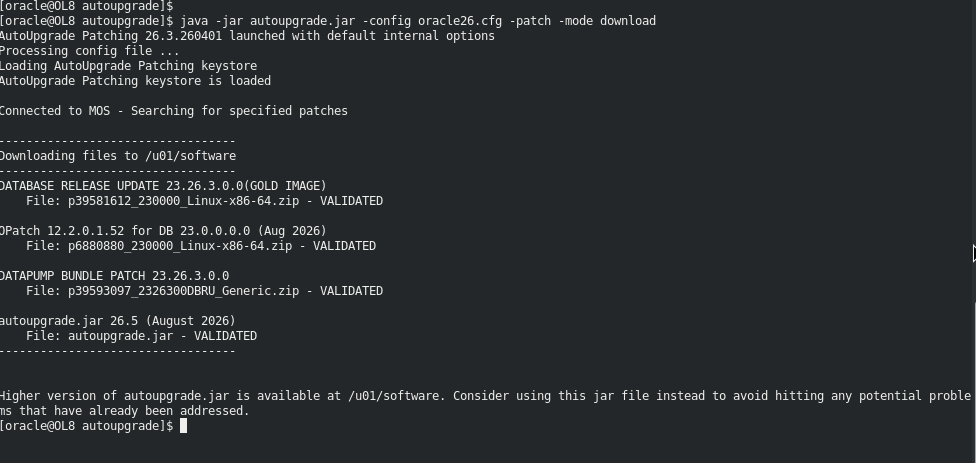
I can confirm the files downloaded
ls -al /u01/software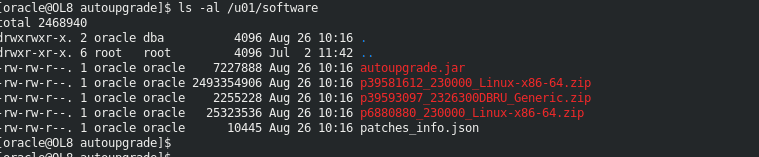
As shown above, there might be a new autoupgrade version, ther .jar file is downloaded automatically and placed in /u01/software or the software home define in the config file.
Update autoupgrade version
To update the autouprade version, simply copy the downloaded .jar file over to the root autoupgrade directory, replacing the old autoupgrade file.
cd /u01/autoupgrade
mv autoupgrade.jar autoupgrade.jar.old
cp /u01/software/autoupgrade.jar .
Step 2 : Detach Old home
There is no built in command in autoupgrade to upgrade an existing home (I tried and looked, I really did). It seems like the only way to cycle between home directories is to detach the non-current home, clear it out and apply the new software to it (I’d advise a backup of the directory prior to doing this). I detached the home from inventory:
--detach home
/u01/app/oracle/product/23.26.0.0/dbhome_1/oui/bin/runInstaller -silent -detachHome ORACLE_HOME="/u01/app/oracle/product/23.26.0.0/dbhome_1"
I then cleared my old directory:
rm -rf /u01/app/oracle/product/23.26.0.0/dbhome_1/*My poor old vm ran out of swap space so I had to add some more using a swapfile :
sudo dd if=/dev/zero of=/tmp/tempswap bs=1M count=1024
sudo chmod 600 /tmp/tempswap
sudo mkswap /tmp/tempswap
sudo swapon /tmp/tempswap
To confirm the swap space
free -mI then tried again
/u01/app/oracle/product/23.26.0.0/dbhome_1/oui/bin/runInstaller -silent -detachHome ORACLE_HOME="/u01/app/oracle/product/23.26.0.0/dbhome_1"Step 3: Create a new oracle home
I can now create a “new” oracle home using autoupgrade
cd /u01/autoupgrade
java -jar autoupgrade.jar -config oracle26.cfg -patch -mode create_home
I then verified the patches in the new home
/u01/app/oracle/product/23.26.0.0/dbhome_1/OPatch/opatch lspatches

39593097;DATAPUMP BUNDLE PATCH 23.26.3.0.0
39578859;OCW RELEASE UPDATE 23.26.3.0.0 (39578859) Gold Image
39578879;Database Release Update : 23.26.3.0.0 (39578879) Gold Image

OPatch succeeded.
Step 4: Create pfile to prevent listener registration
I prevent database from registering with the listener (enabling “downtime” or patching) by creating a pfile
. oraenv
orcl
sqlplus / as sysdba
create pfile from spfile ;
exit
cd $ORACLE_HOME/dbs
vi initORCL.ora
At the bottom of the file, I add the line
*.local_listener="(ADDRESS_LIST=(ADDRESS=(PROTOCOL=TCP)(HOST=localhost.localdomain) (PORT=1522)))"This points the database to a listener that does not exist listening on port 1522. This prevents listener registration and thus applications are unable to connect to the database. If your listener is listening on this port, this will not work for you. modify as per your environment.
Step 5: Patch database
Add new lines to config file
cd /u01/auto upgrade
vi oracle26.cfg
Then add the lines
install1.source_home=/u01/app/oracle/product/23.26.0.0/dbhome_1
install1.sid=orcl
ensure the database including all pluggables are up and running, if not start the databases
. oraenv
orcl
sqlplus / as sysdba
create pfile from spfile ;
startup pfile;
alter pluggable database all open read write ;
exit
The pfile contains the lines preventing listener registration. This allow for few minutes of downtime for patching as no connection using the database services can be established. Ideally, the listener should be up for prod so other database can still connect.
We first run the analyze to ensure the patch can be applied with no issues
#analyze patch
java -jar autoupgrade.jar -config oracle26.cfg -patch -mode analyze
Then I ran the patch in deploy mode
#deploy patch
java -jar autoupgrade.jar -config oracle26.cfg -patch -mode deploy
Verify logs
more /u01/autoupgrade/logs/cfgtoollogs/upgrade/auto/status/status.logConfirm there are no errors in logfile.
Step 6: Update listener
Listener files will get copied over to the new Oracle home. The listener however needs to be started from the new oracle_home, the following steps can be used to do that:
. oraenv
orcl
lsnrctl version
lsnrctl status
--if running then stop
lsnrctl stop
--if not then start
lsnrctl start (starts listener in new home)
lsnrctl version
lsnrctl status
Step 7: verify DB patches
I Set my environment and connect to the database
. oraenv
orcl
sqlplus / as sysdba

SQL*Plus: Release 23.26.3.0.0 - Production on Thu Aug 27 15:57:35 2026
Version 23.26.3.0.0

Copyright (c) 1982, 2026, Oracle.  All rights reserved.

Connected to:
Oracle AI Database 26ai Enterprise Edition Release 23.26.3.0.0 - Production
Version 23.26.3.0.0
I check the oratab
grep orcl /etc/oratab
orcl:/u01/app/oracle/product/23.26.0.0/dbhome_1:N
Check dba_patch_registry in both the CDB and PDB to verify that patches were indeed applied and status is success
--verify versions shown
SET LINESIZE 200
SET PAGESIZE 100
COL con_id FORMAT 999
COL patch_id FORMAT 9999999999
COL action FORMAT A10
COL status FORMAT A15
COL description FORMAT A60

SELECT con_id, patch_id, action, status, description,
TO_CHAR(action_time, 'YYYY-MM-DD HH24:MI:SS') as applied_time
FROM cdb_registry_sqlpatch
ORDER BY action_time DESC;

CON_ID	  PATCH_ID ACTION     STATUS	      DESCRIPTION						   APPLIED_TIME
------ ----------- ---------- --------------- ------------------------------------------------------------ -------------------
     1	  39578879 APPLY      SUCCESS	      Database Release Update : 23.26.3.0.0 (39578879) Gold Image  2026-08-26 15:15:13
     1	  39593097 APPLY      SUCCESS	      DATAPUMP BUNDLE PATCH 23.26.3.0.0 			   2026-08-26 15:08:33

ALTER SESSION SET CONTAINER=ORCLPDB1 ;

SET LINESIZE 200
COL patch_id FORMAT 9999999999
COL action FORMAT A10
COL status FORMAT A15
COL description FORMAT A50
col description for a60
col action_time for a35

SELECT patch_id, action, status, description, action_time
FROM dba_registry_sqlpatch
ORDER BY action_time DESC;

  PATCH_ID ACTION     STATUS	       DESCRIPTION						    ACTION_TIME
----------- ---------- --------------- ------------------------------------------------------------ -----------------------------------
   39578879 APPLY      SUCCESS	       Database Release Update : 23.26.3.0.0 (39578879) Gold Image  26-AUG-26 03.15.13.517211 PM
   39593097 APPLY      SUCCESS	       DATAPUMP BUNDLE PATCH 23.26.3.0.0			    26-AUG-26 03.14.56.879689 PM
Step 8: Enable dynamic service registration
To enable Dynamic service registration with the listener, I start the database up using the spfile enabling service registration and client connectivity
. oraenv
orcl
sqlplus / as sysdba
shutdown immediate;
startup;
ALTER PLUGGABLE DATABASE ALL OPEN;
exit ;
Conclusion
Cycling between oracle homes is a common out-of-place patching style used in many shops. While On my personal laptop I can’t afford to create many copies of the oracle home everytime I apply a new patch, it could also make it a lot more work for maintanaibility and manageability. Perhaps in upcoming releases there will be a native command to overwrite an existing home using autoupgrade but as of this writing I am not aware there is one (please let me know if there is). All in all, in order to move between both homes it requires detaching the older home and creatinga new one for the latest software.
I hope this blog post was informative for you and I’d like to thank you for reading.