

What is the High Water Mark (HWM)?
The high water mark in oracle refers to a point in a segment beyond which data blocks are unformatted and have never been used. If we imagine a data block as a Rectangular block of data that fills up from left to right, then the high water mark is the rightmost point of the rectangle that has ever contained data. In other words, the HWM is the boundary between a segment’s used and unused space. It is a marker that separates formatted blocks (used or available for use) from unformatted blocks that have never been allocated or used.
The high water mark can have an interesting impact on performance. This short blog explains what the high water mark is and how it affects performance especially in regards to full table scans.
Full Scans and the High-Water Mark
A full table scan always reads all of the blocks “below the high-water mark” for a segment.
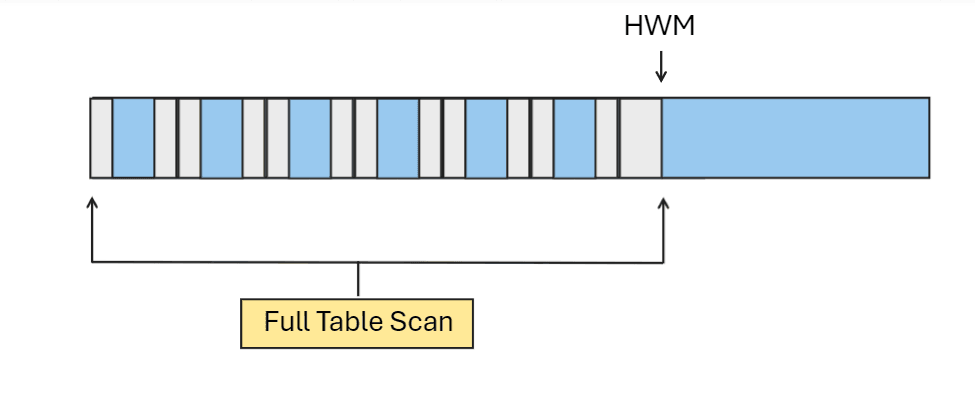
Any block that, at some point, contained data will be scanned in a full scan. This means that a full scan may do extra work by scanning blocks that are currently empty.
Example
Consider this trivial example; We’ll create a table, query it, and observe the blocks scanned. Then we’ll delete half of the rows in this table and do it again. Then we’ll rebuild it and observe the results.
We create the table, query all rows and observe the query performance:
CREATE TABLE t
  AS
    SELECT
          rownum                     c1
         ,dbms_random.string('X',10) c2
FROM
     dual
CONNECT BY LEVEL <= 500000
/

Table created.
The query below shows the maximum block allocation of our table created:
SELECT
       segment_name
      ,segment_type
      ,round(max(block_id+blocks)*8192/1024/1024) || ' mb' allocated_mb
FROM
       dba_extents
WHERE
       segment_name = Upper('&segment_name')
GROUP BY
       segment_name      ,segment_type
/

SEGMENT_NAME         SEGMENT_TYPE       ALLOCATED_MB
-------------------- ------------------ --------------------
T                    TABLE              35 mb
We can also see the extent distribution using the query sel_exts_at_hwm.sql.
SELECT *
    FROM (
            SELECT
                         e.extent_id,
                         e.tablespace_name,
                         e.file_id,
                         e.segment_name,
                         e.segment_type,
                         e.block_id,
                         e.blocks,
                         ROUND((e.block_id + e.blocks) * 8192 / 1024 / 1024, 2) AS end_position_mb
                  FROM   dba_extents e
                  WHERE  e.tablespace_name = 'HR'
                  AND    e.segment_name = 'T'
                  ORDER BY e.block_id DESC
               )
WHERE rownum <= 40
/

 EXTENT_ID TABLESPACE_NAME         FILE_ID SEGMENT_NAME         SEGMENT_TYPE         BLOCK_ID     BLOCKS END_POSITION_MB
---------- -------------------- ---------- -------------------- ------------------ ---------- ---------- ---------------
        15 HR                           13 T                    TABLE                    4448          8           34.81
        14 HR                           13 T                    TABLE                    4440          8           34.75
        13 HR                           13 T                    TABLE                    4432          8           34.69
...
        17 HR                           13 T                    TABLE                     768        128               7
        16 HR                           13 T                    TABLE                     640        128               6
         5 HR                           13 T                    TABLE                     504          8               4
         4 HR                           13 T                    TABLE                     496          8            3.94
We can see the extent distribution from the lowest to the highest.
We set autotrace on and observe the performance of the query:
SQL> select count(*) from t;

  COUNT(*)
----------
    500000


Execution Plan
----------------------------------------------------------
Plan hash value: 2966233522

-------------------------------------------------------------------
| Id  | Operation          | Name | Rows  | Cost (%CPU)| Time     |
-------------------------------------------------------------------
|   0 | SELECT STATEMENT   |      |     1 |   988   (1)| 00:00:01 |
|   1 |  SORT AGGREGATE    |      |     1 |            |          |
|   2 |   TABLE ACCESS FULL| T    |   500K|   988   (1)| 00:00:01 |
-------------------------------------------------------------------


Statistics
----------------------------------------------------------
          0  recursive calls
          0  db block gets
       3551  consistent gets
       3545  physical reads
          0  redo size
        550  bytes sent via SQL*Net to client
        384  bytes received via SQL*Net from client
          2  SQL*Net roundtrips to/from client
          0  sorts (memory)
          0  sorts (disk)
          1  rows processed
As shown above, we perform a full table scan of table t.
If we delete half of the rows in the table, and run the same query again, the performance will not be much different.
SQL> DELETE FROM t
     WHERE mod(c1,2) <> 0  ;

250000 rows deleted.

SQL> SELECT count(*)
  2  FROM t ;

  COUNT(*)
----------
    250000

SQL>
SQL> SET AUTOTRACE ON
SQL>
SQL>
SQL> SELECT count(*)
  2  FROM t ;

  COUNT(*)
----------
    250000


Execution Plan
----------------------------------------------------------
Plan hash value: 2966233522

-------------------------------------------------------------------
| Id  | Operation          | Name | Rows  | Cost (%CPU)| Time     |
-------------------------------------------------------------------
|   0 | SELECT STATEMENT   |      |     1 |   988   (1)| 00:00:01 |
|   1 |  SORT AGGREGATE    |      |     1 |            |          |
|   2 |   TABLE ACCESS FULL| T    |   500K|   988   (1)| 00:00:01 |
-------------------------------------------------------------------


Statistics
----------------------------------------------------------
          0  recursive calls
          0  db block gets
       3551  consistent gets
          0  physical reads
          0  redo size
        550  bytes sent via SQL*Net to client
        385  bytes received via SQL*Net from client
          2  SQL*Net roundtrips to/from client
          0  sorts (memory)
          0  sorts (disk)
          1  rows processed

SQL>
Notice how Oracle did exactly the same number of consistent gets (logical I/Os). That is because every block under the high water mark (all of the blocks that at some point contained data) must be scanned regardless of whether or not they currently contain any data.
We can use the below query to see the amount of free space in the segment at this point:
WITH
    FUNCTION freebytes (
        segment_owner  VARCHAR2,
        segment_name   VARCHAR2,
        segment_type   VARCHAR2,
        partition_name VARCHAR2
    ) RETURN NUMBER AS
        unf   NUMBER;
        unfb  NUMBER;
        fs1   NUMBER;
        fs1b  NUMBER;
        fs2   NUMBER;
        fs2b  NUMBER;
        fs3   NUMBER;
        fs3b  NUMBER;
        fs4   NUMBER;
        fs4b  NUMBER;
        full  NUMBER;
        fullb NUMBER;
    BEGIN
        dbms_space.space_usage(segment_owner, segment_name, segment_type, unf, unfb,
                               fs1, fs1b, fs2, fs2b, fs3,
                               fs3b, fs4, fs4b, full, fullb,
                               partition_name => partition_name);
        RETURN unfb + fs1b + fs2b * 0.25 + fs3b * 0.5 + fs4b * 0.75;
    END;
SELECT
    owner,
    segment_name,
    segment_type,
    bytes/1024/1024 mbytes_allocated,
    (bytes/1024/1024) - ( round(freebytes(owner, segment_name, segment_type, partition_name) / 1024 / 1024, 3)) mbytes_used,
    round(freebytes(owner, segment_name, segment_type, partition_name) / 1024 / 1024, 3) free_mb
FROM
    dba_segments
WHERE
        segment_name = 'T'
AND     owner = 'HR'
ORDER BY free_mb DESC
FETCH FIRST 10 ROWS ONLY
/

OWNER                SEGMENT_NAME                        SEGMENT_TYPE         MBYTES_ALLOCATED MBYTES_USED    FREE_MB
-------------------- ----------------------------------- -------------------- ---------------- ----------- ----------
HR                   T                                   TABLE                              29      15.152     13.848
As shown above, the segment has been allocated 29MB, but only 15.152MB is actually being used. This means there’s some unused space occupied by this segment.
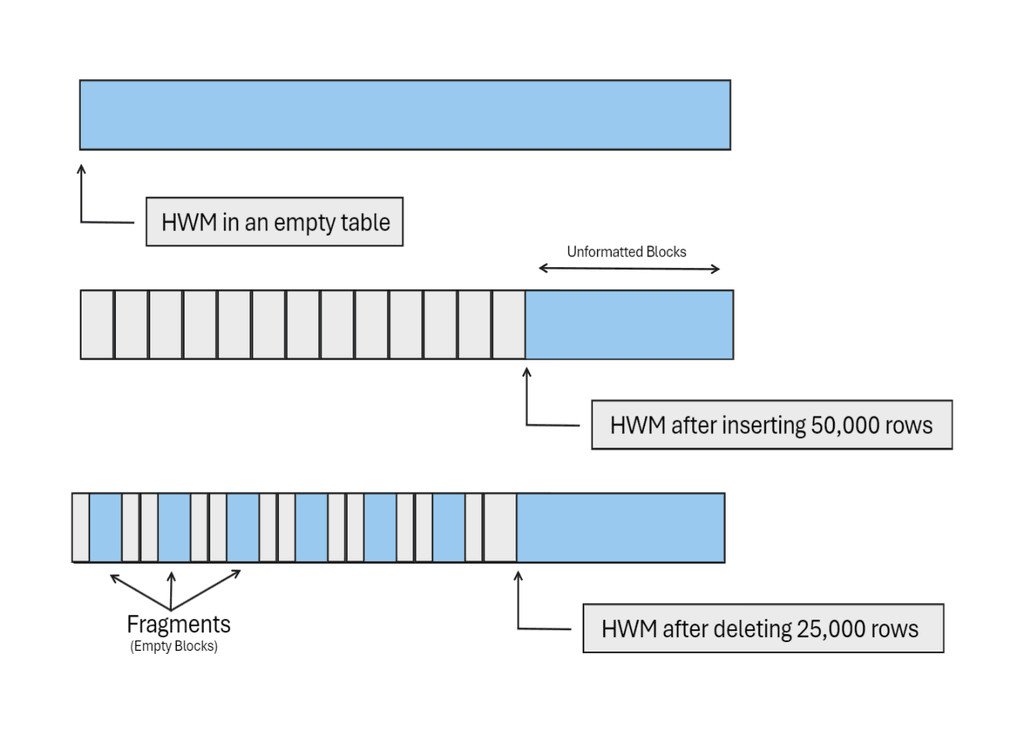
In this case, the database does more work than it needs to do to return the results. Let’s see how we can avoid this
Reducing the Blocks Scanned
One way to avoid scanning empty blocks below the HWM would be to rebuild the table using ALTER TABLE MOVE [ONLINE].
MOVE operations reorganize the table, effectively packing the data into fewer blocks.
SQL> ALTER TABLE t MOVE ONLINE ;

Table altered.

SQL> SET AUTOTRACE ON ;
SQL>
SQL> SELECT COUNT(*)
  2  FROM t;

  COUNT(*)
----------
    250000


Execution Plan
----------------------------------------------------------
Plan hash value: 2966233522

-------------------------------------------------------------------
| Id  | Operation          | Name | Rows  | Cost (%CPU)| Time     |
-------------------------------------------------------------------
|   0 | SELECT STATEMENT   |      |     1 |   988   (1)| 00:00:01 |
|   1 |  SORT AGGREGATE    |      |     1 |            |          |
|   2 |   TABLE ACCESS FULL| T    |   500K|   988   (1)| 00:00:01 |
-------------------------------------------------------------------


Statistics
----------------------------------------------------------
          1  recursive calls
          1  db block gets
       1777  consistent gets
       1773  physical reads
        104  redo size
        550  bytes sent via SQL*Net to client
        384  bytes received via SQL*Net from client
          2  SQL*Net roundtrips to/from client
          0  sorts (memory)
          0  sorts (disk)
          1  rows processed

SQL>
Notice that Oracle now performs half as many consistent gets as it did earlier.
This reorganizes the table, reducing the number of blocks needed to store the rows. Now, there are only enough blocks below the high-water mark to actually hold the rows with data.
Alternatives to DELETE
If you purge large tables frequently, you may want to use methods other than a DELETE, which does not lower the high water mark, to perform your purge. This is something to consider if you have periodic purges of large amounts of information in a table that you full scan occasionally (or frequently).
Some alternatives include:
- Partitioning: You can simply truncate or drop the partition with data to be purged. These acts lower the high water mark or eliminate it altogether.
- Use CREATE and RENAME: You can create a “temporary” table using CREATE TABLE TEMP AS SELECT , followed by DROP OLD_TABLE. the SELECT statement used to create the table TEMP should copy only the data to be retained. After dropping the old table, the TEMP table can then be renamed to the original table name.
- Using TRUNCATE instead of DELETE: A TRUNCATE operation is different from a DELETE in that it resets the HWM for a table. It will also truncate the associated indexes.
Differences between truncate and Delete:
| DELETE | TRUNCATE |
| DML | DDL |
| No Implicit COMMIT | Implicit COMMIT |
| UNDO for table data | No row-level UNDO for table data. |
| can issue a ROLLBACK to restore the Data before committing | Data cannot be Rolled back |
| Typically slower | Typically faster |
| Does not lower the HWM. | Resets the HWM. |
Conclusion
This short post talked a bit about the high water mark and the influence it can have on query performance, particularly for full table scans. We also touched on avoiding these full table scans by re-organizing tables after a DELETE operation. Lastly, we explored alternatives to a DELETE operation for purging large tables and the difference between DELETE and TRUNCATE. There is a lot more to the high water mark than what is discussed in this post and I have included some links to learn more. Hope you found this helpful and thanks for reading.
Cheers, Harris.