

Brief Primer: Locks, Blocks and Transactions
In an earlier post, I talked about locks and transaction concurrency. A lock is a mechanism used by Oracle to restrict access to a shared resource. Also, in another post, the importance of indexing foreign key columns, I explore how these locks on child tables can lead to blocking. This is a situation where a session is waiting for a resource that is currently locked by another session. Similarly, there are scenarios where a session can hold a lock that another session needs while also requiring a lock that another session holds. This Scenario is called a deadlock.
Deadlocks
Deadlocks occur when user A has a resource that user B wants locked, and user B has a resource that user A wants locked. User A is blocked on user B; user B is blocked on user A. That is a deadlock! A deadlock occurs when two or more sessions are waiting for resources locked by each other, resulting in all the sessions being blocked. Oracle automatically detects and resolves deadlocks by rolling back the statement associated with the transaction that detects the deadlock.
What happens then?
Deadlocks are automatically cleared. One of the sessions will have the statement that encountered the deadlock rolled back. According to this post from Asktom, one of the main cause of deadlocks is unindexed foreign keys.
This post talks about deadlocks in Oracle and steps that can be taken to prevent them.
Blocking vs Deadlocks
Blocks and deadlocks are similar but distinct. To clarify, here are some differences between a Block and a deadlock tabularized.
| Feature | Block | Deadlock |
|---|---|---|
| System Status | Normal system occurrence. | Error caused by application design flaw. |
| Resolution Method | Resolves when the holding transaction issues a COMMIT or ROLLBACK. | Oracle automatically resolves deadlocks by rolling back the statement associated with the transaction that detects the deadlock. |
| Alert Log Impact | Does not generate any message in the Oracle Alert Log. | Generates a trace file containing information about the deadlock and an entry in the database alert.log. |
| Common Cause | Normal concurrent application traffic. | Inconsistent locking order, unindexed foreign keys, bitmap indexes with concurrent DML, or other application/schema design issues. |
Deadlock Example
Let us examine an example deadlock scenario. The code in this post can be used to create the tables that will be used for the following example.
From the first session, we update one row in the parent table dept.
--session 1
update dept
set   dept_id = 6
where dept_id = 5 ;

1 row updated.
In the second session, we update one row in the child table emp.
--session 2
update emp
set    dept_id = 3
where  emp_id = 1 ;

1 row updated.
From the first session again, we attempt to update the same row in the emp table that was updated by the second session and has not yet been committed.
--session 1
update emp
set    dept_id = 4
where  emp_id = 1 ;
This session now waits for the second session to release the lock. The first session is blocked because the second session has a lock on that row.
From the second session, we attempt to update the parent table dept for the same row that has been updated by the first session.
--session 2
update dept
set dept_id = 11
where dept_id = 5 ;
This update is also blocked because the parent-key update requires access to the child table, where the first session is holding a lock.
This is a classic deadlock scenario. Oracle automatically resolves this by rolling back the statement that encountered the deadlock. That session gets the ORA-00060 error :
ERROR at line 2:
ORA-00060: deadlock detected while waiting for resource
Help: https://docs.oracle.com/error-help/db/ora-00060/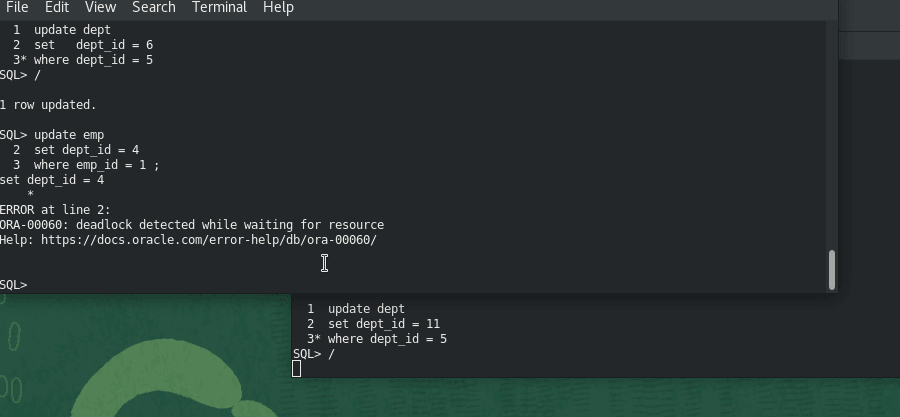
Other Causes of Deadlocks
As mentioned above, unindexed foreign keys are one of the main causes of deadlocks in an Oracle database. Other common causes include:
- Inconsistent Order of operations : In the example above, the 2 sessions update the tables in a different order, which also contributes to the deadlock.
- Long Running Transactions : If a transaction doesn’t commit after it has completed its work, it holds locks for longer than necessary. This can cause other sessions to be blocked and thus contribute to deadlocks. However, they do not cause a deadlock on their own.
- Bitmap Indexes with Concurrent DML: As shown in my previous post about unindexed foreign keys, bitmap indexes are generally not suited for OLTP environments. They’re much better for OLAP and Data Warehousing workloads.
Resolving Deadlocks
As earlier mentioned and demonstrated, Oracle automatically detects and resolves deadlocks. Moreover, our goal as database developers is to attempt to design applications properly such that users do not get to experience deadlocks.
Dealing with Deadlocks
If you are experiencing deadlocks in your application code, the three-step methodology of identify, resolve, avoid can help.
Identify
Deadlocks can be identified by locating the error messages in the alert log file. The associated trace file provides more information for diagnosing the cause. The alert log and trace files are stored in Oracle’s Automatic Diagnostic Repository (ADR).
[oracle@OL8 ~]$ cd /u01/app/oracle/diag/rdbms/orcl/orcl/trace/
[oracle@OL8 trace]$
[oracle@OL8 trace]$
[oracle@OL8 trace]$
[oracle@OL8 trace]$ tail -n100 alert_orcl.log
...
The output should contains lines like:
ORCLPDB1(3):Errors in file /u01/app/oracle/diag/rdbms/orcl/orcl/trace/orcl_ora_6926.trc:
2026-08-19T08:12:28.924570-05:00
ORCLPDB1(3):ORA-00060: Deadlock detected. See Note 60.1 at My Oracle Support for Troubleshooting ORA-60 Errors. More info in file /u01/app/oracle/diag/rdbms/orcl/orcl/trace/orcl_ora_6926.trc.
2026-08-19T08:18:37.136515-05:00
The associated trace file contains more information about the deadlock, including the deadlock graph.
Resolve
To resolve a deadlock, the application can either retry the statement or issue a ROLLBACK and return session control to the user. There are advantages and disadvantages of both as shown in this video.
Avoid
Avoiding deadlocks typically involves re-writing application code such that these scenarios do not occur. Here are some practical steps that could be taken to prevent deadlocks from occurring.
Preventing Deadlocks
There are various strategies that could be used to prevent a deadlock. They include the following:
- Attempt to lock resources at the start of a transaction using
SELECT FOR UPDATE. - Index foreign key columns.
- Ensure that the application code locks resources in the same order.
- Keep transactions short by issuing a
COMMITorROLLBACKas soon as the business logic is complete. - Make use of B-tree instead of Bitmap indexes for OLTP activity.
Conclusion
This post talked about deadlocks and the circumstances that can cause them to occur in the Oracle Database. Also, we examined that deadlocks are not a database but rather an application design issue. In addition, we looked at how they differ from blocks and locks and explored an example scenario of a deadlock. Further, we looked at the various methods that could be employed to identify, resolve, and subsequently avoid these deadlocks in our applications.
I hope you find this information helpful and I would like to thank you for reading.
References and Further reading.
To learn more about deadlocks in an Oracle Database, here is a good video on the subject.