
Short overview
A hierarchical query (or hierarchical queries) is a special type of query in oracle used to retrieve and process parent-child relationships within a data set. The key clauses used to build such a query include;
- start with: defines the root of the cycle
- connect by: specifies the relationship between child and parent
- prior: A mandatory operator that tells Oracle which expression refers to the parent row
- level: a pseudocolumn that automatically assigns a number representing the depth in the tree
- nocycle: revents infinite loops if the data accidentally contains a circular reference
More details about these cluases can be found here : hierarchical queries in oracle
There also exists recursive common table expressions which can be used to solve hierarchical queries
I was once given a requirement that required me to employ hierarchical queries to resolve… with a twist
This blog post serves to describe that problem(not the exact one but the same idea) and the resolutions I took
THE DATA
In order to describe the problem, let’s create a table and insert some data.
CREATE TABLE bom_table
(
  pk_seq         NUMBER
 ,root_parent    VARCHAR2(100 CHAR)
 ,end_item       VARCHAR2(100 CHAR)
 ,parent_part    VARCHAR2(100 CHAR)
 ,part_number    VARCHAR2(100 CHAR)
 ,bom_level      NUMBER
 ,part_lead_time NUMBER
 ,CONSTRAINT bom_table_pk PRIMARY KEY (pk_seq)
);
Insert into BOM_TABLE (PK_SEQ,ROOT_PARENT,END_ITEM,PARENT_PART,PART_NUMBER,BOM_LEVEL,PART_LEAD_TIME) values (1,'CAR','BODY','CAR','BODY',1,3);
Insert into BOM_TABLE (PK_SEQ,ROOT_PARENT,END_ITEM,PARENT_PART,PART_NUMBER,BOM_LEVEL,PART_LEAD_TIME) values (2,'CAR','BODY','BODY','DOOR',2,2);
Insert into BOM_TABLE (PK_SEQ,ROOT_PARENT,END_ITEM,PARENT_PART,PART_NUMBER,BOM_LEVEL,PART_LEAD_TIME) values (3,'CAR','BODY','DOOR','WINDOW',3,1);
Insert into BOM_TABLE (PK_SEQ,ROOT_PARENT,END_ITEM,PARENT_PART,PART_NUMBER,BOM_LEVEL,PART_LEAD_TIME) values (4,'CAR','BODY','WINDOW','BOLT',4,1);
Insert into BOM_TABLE (PK_SEQ,ROOT_PARENT,END_ITEM,PARENT_PART,PART_NUMBER,BOM_LEVEL,PART_LEAD_TIME) values (5,'CAR','ENGINE','CAR','ENGINE',1,4);
Insert into BOM_TABLE (PK_SEQ,ROOT_PARENT,END_ITEM,PARENT_PART,PART_NUMBER,BOM_LEVEL,PART_LEAD_TIME) values (6,'CAR','ENGINE','ENGINE','CYLINDER',2,2);
Insert into BOM_TABLE (PK_SEQ,ROOT_PARENT,END_ITEM,PARENT_PART,PART_NUMBER,BOM_LEVEL,PART_LEAD_TIME) values (7,'CAR','ENGINE','CYLINDER','PISTON',3,3);
Insert into BOM_TABLE (PK_SEQ,ROOT_PARENT,END_ITEM,PARENT_PART,PART_NUMBER,BOM_LEVEL,PART_LEAD_TIME) values (8,'CAR','ENGINE','PISTON','SCREW',4,1);
Insert into BOM_TABLE (PK_SEQ,ROOT_PARENT,END_ITEM,PARENT_PART,PART_NUMBER,BOM_LEVEL,PART_LEAD_TIME) values (9,'CAR','ENGINE','CYLINDER','VALVE',3,4);
Insert into BOM_TABLE (PK_SEQ,ROOT_PARENT,END_ITEM,PARENT_PART,PART_NUMBER,BOM_LEVEL,PART_LEAD_TIME) values (10,'CAR','ENGINE','VALVE','SPRING',4,1);
Insert into BOM_TABLE (PK_SEQ,ROOT_PARENT,END_ITEM,PARENT_PART,PART_NUMBER,BOM_LEVEL,PART_LEAD_TIME) values (11,'CAR','FRAME','CAR','FRAME',1,2);
Insert into BOM_TABLE (PK_SEQ,ROOT_PARENT,END_ITEM,PARENT_PART,PART_NUMBER,BOM_LEVEL,PART_LEAD_TIME) values (12,'CAR','FRAME','FRAME','SUPPORT',2,2);
Insert into BOM_TABLE (PK_SEQ,ROOT_PARENT,END_ITEM,PARENT_PART,PART_NUMBER,BOM_LEVEL,PART_LEAD_TIME) values (13,'BIKE','FRAME','BIKE','FRAME',1,3);
Insert into BOM_TABLE (PK_SEQ,ROOT_PARENT,END_ITEM,PARENT_PART,PART_NUMBER,BOM_LEVEL,PART_LEAD_TIME) values (14,'BIKE','FRAME','FRAME','PEDAL',2,2);
Insert into BOM_TABLE (PK_SEQ,ROOT_PARENT,END_ITEM,PARENT_PART,PART_NUMBER,BOM_LEVEL,PART_LEAD_TIME) values (15,'BIKE','FRAME','PEDAL','BOLT',3,1);
Insert into BOM_TABLE (PK_SEQ,ROOT_PARENT,END_ITEM,PARENT_PART,PART_NUMBER,BOM_LEVEL,PART_LEAD_TIME) values (16,'BIKE','HANDLE','BIKE','HANDLE',1,2);
Insert into BOM_TABLE (PK_SEQ,ROOT_PARENT,END_ITEM,PARENT_PART,PART_NUMBER,BOM_LEVEL,PART_LEAD_TIME) values (17,'BIKE','HANDLE','HANDLE','GEAR',2,3);
SQL> select * from
  2* bom_table;

   PK_SEQ    ROOT_PARENT    END_ITEM    PARENT_PART    PART_NUMBER    BOM_LEVEL    PART_LEAD_TIME
_________ ______________ ___________ ______________ ______________ ____________ _________________
        1 CAR            BODY        CAR            BODY                      1                 3
        2 CAR            BODY        BODY           DOOR                      2                 2
        3 CAR            BODY        DOOR           WINDOW                    3                 1
        4 CAR            BODY        WINDOW         BOLT                      4                 1
        5 CAR            ENGINE      CAR            ENGINE                    1                 4
        6 CAR            ENGINE      ENGINE         CYLINDER                  2                 2
        7 CAR            ENGINE      CYLINDER       PISTON                    3                 3
        8 CAR            ENGINE      PISTON         SCREW                     4                 1
        9 CAR            ENGINE      CYLINDER       VALVE                     3                 4
       10 CAR            ENGINE      VALVE          SPRING                    4                 1
       11 CAR            FRAME       CAR            FRAME                     1                 2
       12 CAR            FRAME       FRAME          SUPPORT                   2                 2
       13 BIKE           FRAME       BIKE           FRAME                     1                 3
       14 BIKE           FRAME       FRAME          PEDAL                     2                 2
       15 BIKE           FRAME       PEDAL          BOLT                      3                 1
       16 BIKE           HANDLE      BIKE           HANDLE                    1                 2
       17 BIKE           HANDLE      HANDLE         GEAR                      2                 3

17 rows selected.
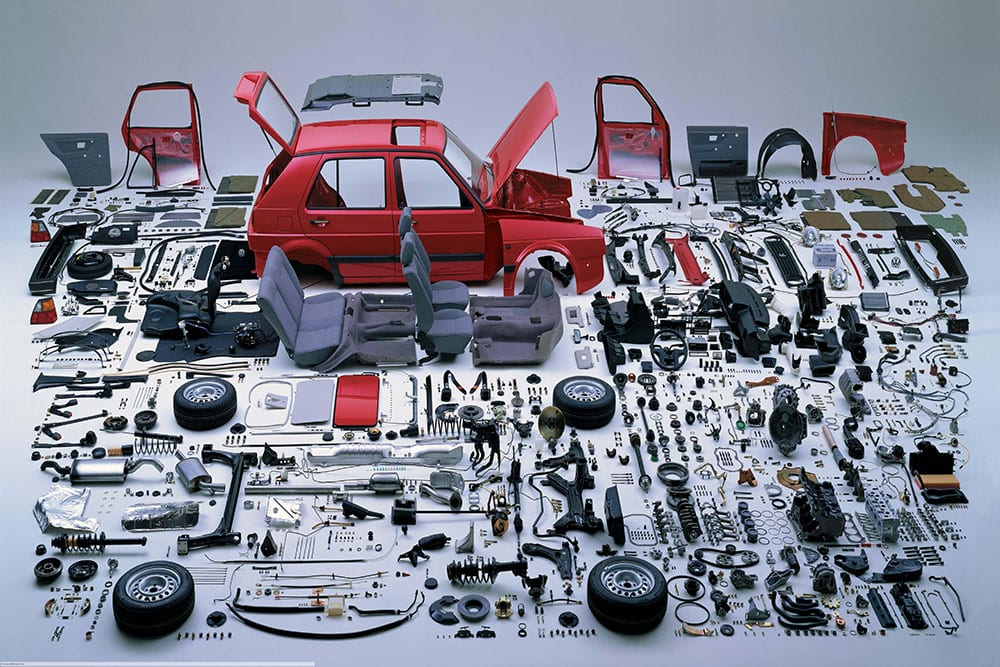
The table above is named bom_table, standing for “Bill of Material” table which is a comprehensive list of raw materials, sub-assemblies, sub-components, parts and the quantities needed to manufacture a product. (for simplicity of the above example, no quantities have been included).
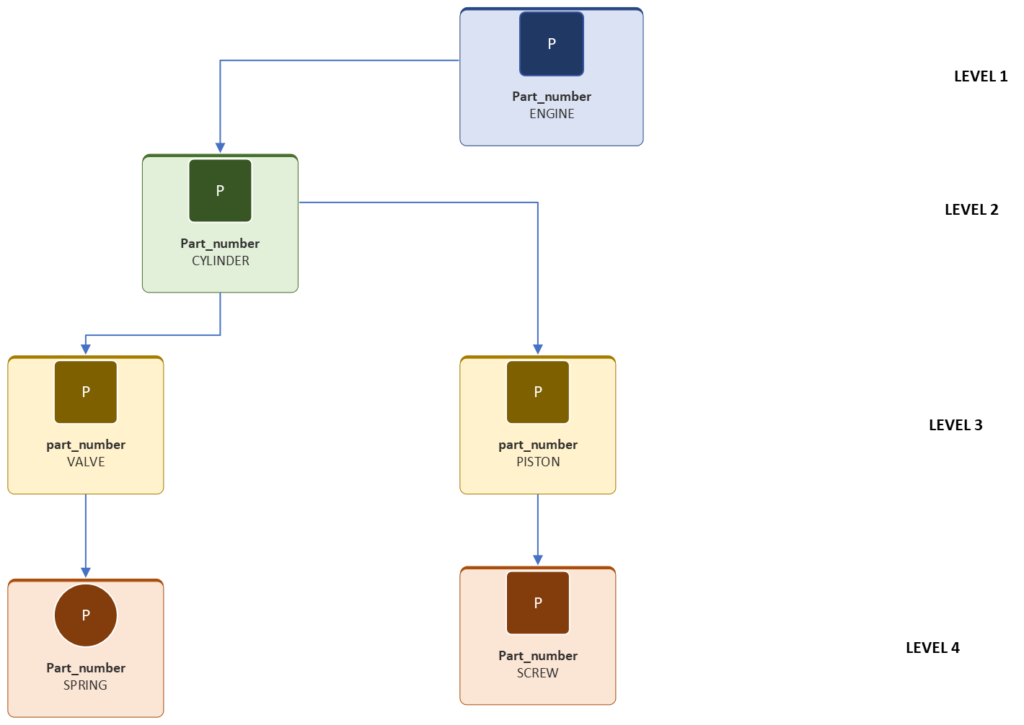
examination of the data shows a table storing information about the component parts needed to build a “car” and a “bike”. The oversimplified example shows that to build a car, a body , engine and frame is required. an engine needs a cylinder and a piston, pistons require screws and cylinders require valves and finally valves require springs. If you pick any end_item(in my example : engine, body and frame of a car) you can go down the tree until you get to the bottom. see below illustration for clarity:
THE PROBLEM
For the above sample data set, consider the below requirement
“Can we please get the total reorder lead time for all end items needed to build a part?” . This was the requirement that came in that took quite some figuring out. It needs some explaining however: in the sample data above, the lead time represents the time it will take to build a particular part. the total reorder lead time represents the longest time it will take to build a part, considering the longest lead time of all sub parts… simple right! let me explain further, for example:
 SQL> SELECT part_number, parent_part, root_parent|| sys_connect_by_path(part_number, ' <- ') part_buildup, bom_level
  2  FROM bom_table
  3  WHERE root_parent = 'CAR'
  4  START WITH bom_level = 1
  5  CONNECT by prior part_number = parent_part
  6  ORDER BY LEVEL
  7* ;

PART_NUMBER          PARENT_PART          PART_BUILDUP                                                                                          BOM_LEVEL
-------------------- -------------------- ---------------------------------------------------------------------------------------------------- ----------
ENGINE               CAR                  CAR <- ENGINE                                                                                                 1
FRAME                CAR                  CAR <- FRAME                                                                                                  1
BODY                 CAR                  CAR <- BODY                                                                                                   1
DOOR                 BODY                 CAR <- BODY <- DOOR                                                                                           2
SUPPORT              FRAME                CAR <- FRAME <- SUPPORT                                                                                       2
CYLINDER             ENGINE               CAR <- ENGINE <- CYLINDER                                                                                     2
SUPPORT              FRAME                CAR <- FRAME <- SUPPORT                                                                                       2
PISTON               CYLINDER             CAR <- ENGINE <- CYLINDER <- PISTON                                                                           3
VALVE                CYLINDER             CAR <- ENGINE <- CYLINDER <- VALVE                                                                            3
WINDOW               DOOR                 CAR <- BODY <- DOOR <- WINDOW                                                                                 3
SCREW                PISTON               CAR <- ENGINE <- CYLINDER <- PISTON <- SCREW                                                                  4
SPRING               VALVE                CAR <- ENGINE <- CYLINDER <- VALVE <- SPRING                                                                  4
BOLT                 WINDOW               CAR <- BODY <- DOOR <- WINDOW <- BOLT                                                                         4
taking a closer look at our data above you can see how the parts roll into their parents which roll into their parents and so on and so forth until the root parent (in this case a car)
if we take an engine as a set case ,
1  select END_ITEM,parent_part, part_number, bom_level, Part_lead_time
  2  from bom_table
  3  where root_parent = 'CAR'
  4  and   end_item = 'ENGINE'
  5* ORDER BY BOM_LEVEL ASC
SQL> /

END_ITEM             PARENT_PART          PART_NUMBER           BOM_LEVEL PART_LEAD_TIME
-------------------- -------------------- -------------------- ---------- --------------
ENGINE               CAR                  ENGINE                        1              4
ENGINE               ENGINE               CYLINDER                      2              2
ENGINE               CYLINDER             PISTON                        3              3
ENGINE               CYLINDER             VALVE                         3              4
ENGINE               PISTON               SCREW                         4              1
ENGINE               VALVE                SPRING                        4              1
it takes 1 day to build a spring and one day to build a screw, and considering that both can be built consecutively then at level 4 of an engine the longest lead time is 1. at level 3 which is the level above 4, it takes 4 days to build a valve and 3 days to build a piston, so the longest lead time is 4 which is the time it takes to build a valve, however a valve requires a spring which takes one day and thus the reorder lead time for a valve is 5. at level 2, the cylinder takes 2 days to build and requires a piston and a valve for which the longest reorder lead time between them is the valve at 5 days so 5+2 = 7 days the total reorder lead time for the cylinder. And finally the engine takes 4 days to build and thus the total reorder lead time for the end item the engine is 7+4 = 11 days. That is what the request above is asking of us programatically.
THE SOLUTION
Acknowledgement : I am convinced , (although I haven’t figured it out quite yet myself) that there could be a better way to arrive at this solution using plain old SQL unfortunately after a lot of back and forth trying multiple analytics like lag and lead, I resorted to using a PL/SQL function. So if you read this and perhaps have a better way of doing this in SQL I will be happy to hear from you in the comments.
As, the above paragraph explains, I resorted to a PL/SQL function to resolve the above requirement. the code looked like this :
FUNCTION get_reorder_lead_time (
    p_part_number IN VARCHAR2,
    p_root_parent IN VARCHAR2
) RETURN NUMBER IS
       TYPE bom_rec IS RECORD (
        part_number     VARCHAR2(100),
        parent_part     VARCHAR2(100),
        bom_level       NUMBER,
        part_lead_time  NUMBER
    );
       TYPE bom_table_type IS TABLE OF bom_rec INDEX BY PLS_INTEGER;
    bom_data bom_table_type;
       TYPE child_map_type IS TABLE OF SYS.ODCIVARCHAR2LIST INDEX BY VARCHAR2(100);
    child_map child_map_type;
       TYPE time_map_type IS TABLE OF NUMBER INDEX BY VARCHAR2(100);
    time_map time_map_type;
       result_cache time_map_type;
    v_idx INTEGER := 0;
       FUNCTION calc_chain(p_part VARCHAR2) RETURN NUMBER IS
        v_max_child_chain NUMBER := 0;
        v_total NUMBER;
    BEGIN
           IF result_cache.EXISTS(p_part) THEN
            RETURN result_cache(p_part);
        END IF;
           IF NOT child_map.EXISTS(p_part) THEN
            result_cache(p_part) := NVL(time_map(p_part), 0);
            RETURN result_cache(p_part);
        END IF;
           FOR i IN 1 .. child_map(p_part).COUNT LOOP
            v_total := calc_chain(child_map(p_part)(i));
            IF v_total > v_max_child_chain THEN
                v_max_child_chain := v_total;
            END IF;
        END LOOP;
           result_cache(p_part) := NVL(time_map(p_part), 0) + v_max_child_chain;
        RETURN result_cache(p_part);
    END;
BEGIN
       FOR r IN (
        SELECT part_number, parent_part, bom_level, NVL(part_lead_time, 0) AS part_lead_time
        FROM bom_table
        WHERE root_parent = p_root_parent
        ORDER BY pk_seq
    ) LOOP
        v_idx := v_idx + 1;
        bom_data(v_idx).part_number := r.part_number;
        bom_data(v_idx).parent_part := r.parent_part;
        bom_data(v_idx).bom_level := r.bom_level;
        bom_data(v_idx).part_lead_time := r.part_lead_time;
        -- Store lead time
        time_map(r.part_number) := r.part_lead_time;
        -- Map child to parent
        IF r.parent_part IS NOT NULL THEN
            IF NOT child_map.EXISTS(r.parent_part) THEN
                child_map(r.parent_part) := SYS.ODCIVARCHAR2LIST();
            END IF;
            child_map(r.parent_part).EXTEND;
            child_map(r.parent_part)(child_map(r.parent_part).COUNT) := r.part_number;
        END IF;
    END LOOP;
      IF NOT time_map.EXISTS(p_part_number) THEN
        RETURN 0;
    END IF;
    RETURN calc_chain(p_part_number);
EXCEPTION
    WHEN OTHERS THEN
        RETURN 0;
END;
As you can see, not quite the easiest of functions to read, matter of fact it’s actually quite cryptic and has a lot of PL/SQL concepts employed which I will not go deep into explaining in this post, but at a high level the function accepts a part and it’s root parent as input arguments, generates a “tree” of subparents for that part, calculates the longest lead time at each hierarchy level, adds it to the specified part’s lead time and returns the “reorder lead time for that part”. (phew 😥)
In practice this is the output returned by using the function:
 select parent_part, part_number, bom_level, Part_lead_time, get_reorder_lead_time(part_number, root_parent) longest_lead_time
 from bom_table
 where root_parent = 'CAR'
 and   end_item = 'ENGINE'
 ORDER BY BOM_LEVEL ASC
/

PARENT_PART          PART_NUMBER           BOM_LEVEL PART_LEAD_TIME LONGEST_LEAD_TIME
-------------------- -------------------- ---------- -------------- -----------------
CAR                  ENGINE                        1              4                11
ENGINE               CYLINDER                      2              2                 7
CYLINDER             PISTON                        3              3                 4
CYLINDER             VALVE                         3              4                 5
PISTON               SCREW                         4              1                 1
VALVE                SPRING                        4              1                 1
As explained earlier, you can see that the function correctly computes the longest lead time for an engine based on it’s subcomponnents and that is 11 days. the reorder lead time for every subcomponnent at any level of the BOM can be computed as well. the below query displays the same information for every part needed to build a “car” based on the sample data as well as using sys_connect_by_path to show the “tree” if you may.
 SELECT part_number, parent_part, root_parent|| sys_connect_by_path(part_number, ' <- ') part_buildup, bom_level, get_reorder_lead_time(part_number, root_parent) reorder_lead_time
  2  FROM bom_table
  3  WHERE root_parent = 'CAR'
  4  START WITH bom_level = 1
  5  CONNECT by prior part_number = parent_part
  6  ORDER BY LEVEL
  7* ;

PART_NUMBER          PARENT_PART          PART_BUILDUP                                                                                          BOM_LEVEL REORDER_LEAD_TIME
-------------------- -------------------- ---------------------------------------------------------------------------------------------------- ---------- -----------------
ENGINE               CAR                  CAR <- ENGINE                                                                                                 1                11
FRAME                CAR                  CAR <- FRAME                                                                                                  1                 4
BODY                 CAR                  CAR <- BODY                                                                                                   1                 7
DOOR                 BODY                 CAR <- BODY <- DOOR                                                                                           2                 4
SUPPORT              FRAME                CAR <- FRAME <- SUPPORT                                                                                       2                 2
CYLINDER             ENGINE               CAR <- ENGINE <- CYLINDER                                                                                     2                 7
SUPPORT              FRAME                CAR <- FRAME <- SUPPORT                                                                                       2                 2
PISTON               CYLINDER             CAR <- ENGINE <- CYLINDER <- PISTON                                                                           3                 4
VALVE                CYLINDER             CAR <- ENGINE <- CYLINDER <- VALVE                                                                            3                 5
WINDOW               DOOR                 CAR <- BODY <- DOOR <- WINDOW                                                                                 3                 2
SCREW                PISTON               CAR <- ENGINE <- CYLINDER <- PISTON <- SCREW                                                                  4                 1
SPRING               VALVE                CAR <- ENGINE <- CYLINDER <- VALVE <- SPRING                                                                  4                 1
BOLT                 WINDOW               CAR <- BODY <- DOOR <- WINDOW <- BOLT                                                                         4                 1
And returning to the original request, displaying the lead time for all the “end_items” for a car:
 1  select distinct end_item, get_reorder_lead_time(end_item, root_parent) longest_lead_time
  2  from bom_table
  3* where root_parent = 'CAR'
SQL> /

END_ITEM             LONGEST_LEAD_TIME
-------------------- -----------------
FRAME                                4
ENGINE                              11
BODY                                 7
This could also be done for Bikes in the sample data
 1   SELECT part_number, parent_part, root_parent|| sys_connect_by_path(part_number, ' <- ') part_buildup, bom_level, get_reorder_lead_time(part_number, root_parent) reorder_lead_time
  2  FROM bom_table
  3  WHERE root_parent = 'BIKE'
  4  START WITH bom_level = 1
  5  CONNECT by prior part_number = parent_part
  6* ORDER BY LEVEL
SQL> /

PART_NUMBER          PARENT_PART          PART_BUILDUP                                                                      BOM_LEVEL REORDER_LEAD_TIME
-------------------- -------------------- -------------------------------------------------------------------------------- ---------- -----------------
FRAME                BIKE                 BIKE <- FRAME                                                                             1                 6
HANDLE               BIKE                 BIKE <- HANDLE                                                                            1                 5
GEAR                 HANDLE               BIKE <- HANDLE <- GEAR                                                                    2                 3
PEDAL                FRAME                BIKE <- FRAME <- PEDAL                                                                    2                 3
PEDAL                FRAME                BIKE <- FRAME <- PEDAL                                                                    2                 3
BOLT                 PEDAL                BIKE <- FRAME <- PEDAL <- BOLT                                                            3                 1
BOLT                 PEDAL                BIKE <- FRAME <- PEDAL <- BOLT                                                            3                 1
 1  select distinct end_item, get_reorder_lead_time(end_item, root_parent) longest_lead_time
  2  from bom_table
  3* where root_parent = 'BIKE'
SQL> /

END_ITEM             LONGEST_LEAD_TIME
-------------------- -----------------
FRAME                                6
HANDLE                               5
conclusion
In the end, this exercise reinforced how powerful Oracle’s hierarchical features can be when dealing with real‑world BOM structures. Even when the data model introduces unexpected twists, the combination of START WITH, CONNECT BY, and recursive logic provides a flexible toolkit for navigating parent‑child relationships. With the right approach, even the most tangled hierarchy becomes a predictable and manageable structure.
That said, I am looking forward to someone, anyone who can providing a pure SQL equivalent to my solution.
Cheers, 🎊
