
With the announcement of the latest version of the Oracle database: “Oracle AI Database 26ai” for on-prem, and a lot of the excitement about the tons of cool new features and tighter integration of AI with the database, Most IT folks (I included) working with the Oracle database can’t wait to get their hands on this new version. Here are some of the features I am most excited about as a Database Administrator working with the Oracle database;
- Priority Transaction
- No Dual
- Group by alias & Group by all
- Non-Positional INSERT INTO SET and INSERT INTO BY NAME Clauses
- Direct Joins
- Qualify clause
- shrink tablespace(smallfile and bigfile)
- Materialized Expression Columns
- Assertions
- use case domains
- annotations
- Increased Oracle AI Database Password Length
- SQL History
- Boolean data type
- IF [NOT]EXISTS DDL Clause
- DML RETURNING Clause Enhancements
- SQL Firewall
- db_developer_role
- Audit Object Actions at the Column Level for Tables and Views
In this blog, I will give a brief description of some of these, explain why I am excited about them, how I see them helping me as a DBA, and include links to learn more. For comprehensive info on all new Oracle AI database 26ai features;
Breaking Up with DUAL: It’s Not Me, It’s You
Now, if you have any experience working with Oracle, you have probably used dual say for something like:
SELECT SYSDATE FROM DUAL;It is a simple one-row one-column table.
SQL> DESC sys.dual
Name                            Null?    Type
------------------------------- -------- -----------------------
DUMMY                                    VARCHAR2(1)
This table ensures that every SELECT statement complies with the rule requiring a FROM clause. Developers have used it for all kinds of things over the years, namely running calculations, retrieving system values (sysdate, systimestamp, etc.), calling functions, and returning single rows in scripts. It will be weird to have SQL statements without a FROM clause in the future, but it will reduce a few keystrokes. DUAL definitely served its purpose over the decades; however, I can’t wait to write more code like
SELECT SYSDATE;Shrinking Tablespaces the Easy Way
As a DBA, this is one of my most anticipated features in the new Oracle database version. Managing space just got a whole lot easier. For years, DBAs could shrink individual segments and data files using.
alter table, alter index
&alter database datafile '<file_name>' resize <size> ;
However, an entire tablespace required a lot of object movement, mostly using Data Pump to export and reload data, in the hopes of eliminating empty blocks and compacting everything back together. The new shrink tablespaces feature helps you reclaim unused space at the tablespace level, safely, and online without juggling datafiles and/or scheduling any downtime; a big lifesaver for any DBA. See the video below for more details.
A Bouncer for your Database
For years, Oracle databases relied heavily on application code, network firewalls, or external security tools to catch suspicious SQL. The database itself didn’t really know whether a query was normal, unusual, or outright dangerous — it just executed whatever reached it. That meant SQL injection attempts, unexpected ad‑hoc queries, or rogue tools could slip through if the outer layers missed them.
SQL Firewall changes that by letting Oracle learn what “normal” SQL looks like and block anything that doesn’t fit the pattern. It can enforce allow‑lists, detect anomalies, and stop risky SQL before it ever touches your data.
As a DBA or Developer, this can help better prevent SQL injection, move security closer to the database, and provide clear visibility into who is running what. It’s like giving your database its own personal bouncer.
Express Lane for Important Workloads with TXN priority
In busy Oracle systems, DML transactions can block others, and if users fail to “commit” their transaction, critical updates that need those rows can be stuck waiting… indefinitely. Imagine your payroll batch job not running because a user forgot to close their session before going home for the day, or was/is doing some update at the same time! Obviously, not an ideal scenario. As a database developer, there are a number of things you can use when writing your code to mitigate this (I’m looking at optimistic locking and its various modifiers). However, there are instances where you do not have control over the code being generated.
Transaction Priority changes that by letting you mark certain transactions as high priority, allowing them to jump ahead of lower‑priority blockers. Critical OLTP work can now push through without being held hostage by slow or noisy neighbors. Those transactions that are most critical for your business (like payroll) should be prioritized with a slice of the database pie above others, and with the new Oracle AI Database 26ai (gosh, that’s a… never mind), you have this functionality at your fingertips. See video below for more information:
ALIASES! You’re very welcome!
This one is really personal cause I always hated having an expression like
decode(lpad(power(substr(instr(to_char(<some_column_name>))))) weird_column (or something like that, you get my point, right?)
and then having to type the same thing in the group by, and not just “weird_column,” so when I saw this one, I was elated.
This helps me write clearer, more readable SQL code and reduces the risk of human error. They took it one step further by adding GROUP BY ALL , which allows you not to specify any column at all in the GROUP BY clause (this does have some caveats). Further, aliases can also be used in the HAVING clause. Learn more on oracle_base
A Role Developers Won’t Complain About (For Once)
The new db_developer_role provides a built‑in, least‑privilege role designed specifically for development work. It includes the common privileges developers need without the risky ones they shouldn’t touch.
Oracle now recommends granting this role to developers rather than granting privileges individually. The role includes the following privileges :
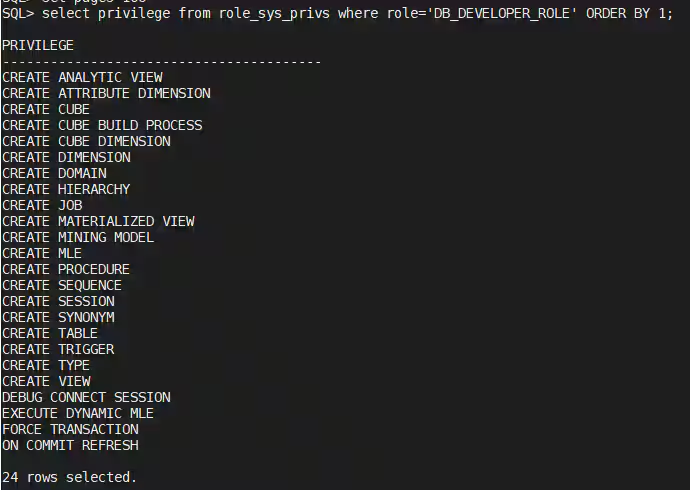
learn more about this on the Oracle base
DDL Without Drama
I write scripts to deploy database objects all the time, and sometimes I have to rerun them multiple times in a test environment to fix errors or when the script is changed, etc. For every run, I grep the log file for errors, then scan the output looking for them and fix them. Sometimes, errors like “Object Already Exists” or “object doesn’t exist” can be ignored. TheIF(not) DDL syntax lets you do this by writing code like
SQL> create table if not exists t1 (id number);

Table created.
Whether or not the table existed prior, I do not get an error message. This helps me avoid writing exception handling blocks and/or wrapping DDL in PL/SQL altogether. It also allows for cleaner CI/CD pipelines and cleaner output logs from deployment scripts. Read more here: oracle_base
Wrapping It All Up — A Friendlier, Smarter Oracle for DBAs
Oracle AI Database 23ai/26ai feels like the first release in a long time that genuinely makes day‑to‑day DBA life easier. From long‑awaited SQL quality‑of‑life fixes to powerful new security tools and smarter workload management, this version isn’t just about AI — it’s about removing friction, modernizing the basics, and giving us features we’ve been asking for. Whether it’s finally ditching DUAL, shrinking tablespaces without gymnastics, or writing cleaner DDL with IF NOT EXISTS, these changes add up to a database that’s faster to work with, safer to operate, and more enjoyable to manage. If this is the direction Oracle is heading, I’m excited to see what comes next.
cheers 🎊