

Introduction
With the release of Oracle Database 23.26.2.0.0, A new join syntax, JOIN TO ONE, has been introduced. It’s meant to simplify the FROM clause and prevent silent row multiplications that may arise from join conditions. In a relational database, relationships are often one-to-many. When a query requires each row from the subject table (RWT) to map to at most one row in the results, JOIN TO ONE enforces this by raising an error if multiple matching rows are found.
This post explores this new feature and shows some examples of its use.
Case Study
Consider a customer and orders relationship like that in the Justlee schema. A customer could have many orders but an order could only have been placed by one customer. This is a typical one-to-many relationship.
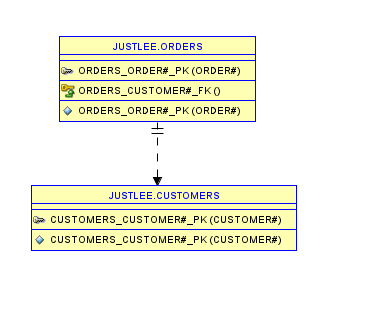
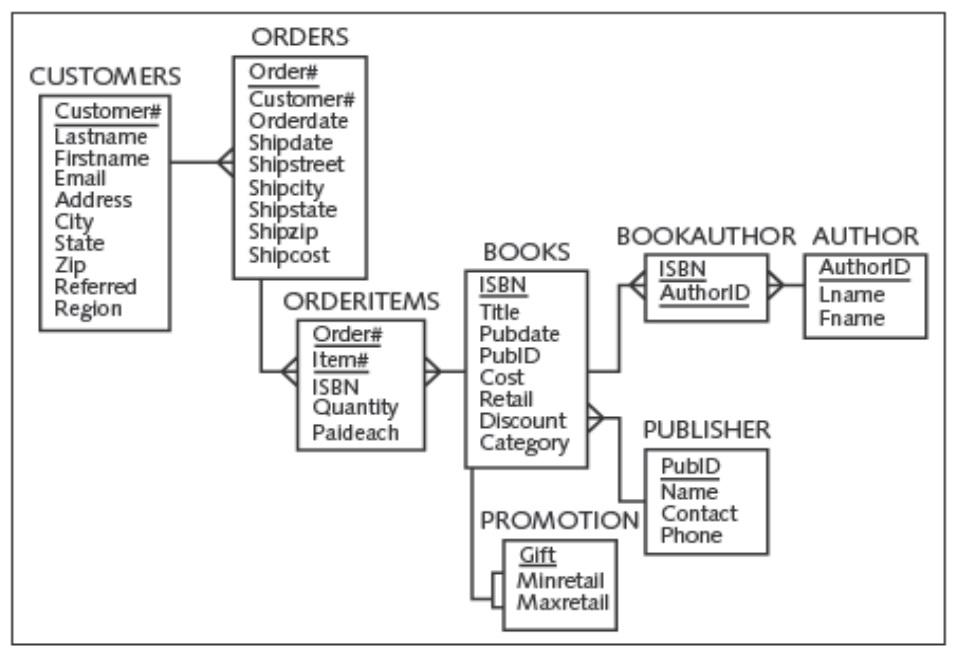
Consider a request to report on all the order numbers for all customers and the order dates. We can resolve this using the query :
  SELECT
         c.customer#
        ,c.firstname || ' ' || c.lastname customer_name
        ,o.order#
        ,o.orderdate
  FROM
                customers c
    INNER JOIN  orders    o    ON    c.customer# = o.customer#
  ORDER BY
         c.customer#
 /

 CUSTOMER# CUSTOMER_NAME             ORDER# ORDERDATE
---------- --------------------- ---------- ---------
      1001 BONITA MORALES              1018 05-APR-09
      1001 BONITA MORALES              1003 01-APR-09
      1003 LEILA SMITH                 1016 04-APR-09
      1003 LEILA SMITH                 1006 01-APR-09
      1004 THOMAS PIERSON              1008 02-APR-09
      1005 CINDY GIRARD                1009 03-APR-09
      1005 CINDY GIRARD                1000 31-MAR-09
      1007 TAMMY GIANA                 1007 02-APR-09
      1007 TAMMY GIANA                 1014 04-APR-09
      1008 KENNETH JONES               1020 05-APR-09
      1010 JAKE LUCAS                  1001 31-MAR-09
      1010 JAKE LUCAS                  1011 03-APR-09
      1011 REESE MCGOVERN              1002 31-MAR-09
      1014 JASMINE LEE                 1013 03-APR-09
      1015 STEVE SCHELL                1017 04-APR-09
      1017 BECCA NELSON                1012 03-APR-09
      1018 GREG MONTIASA               1005 01-APR-09
      1018 GREG MONTIASA               1019 05-APR-09
      1019 JENNIFER SMITH              1010 03-APR-09
      1020 KENNETH FALAH               1004 01-APR-09
      1020 KENNETH FALAH               1015 04-APR-09

21 rows selected.
The “Row Explosion” Problem
In the results above, customer 1001 is returned twice, albeit for two different order numbers. This is fine as in a one-to-many relationship this is expected. However, sometimes this row multiplication is unwanted or unexpected. Typical SQL join syntax doesn’t prevent this from happening; rather, it silently multiplies the rows.
For example, we may want to display the books the customers ordered alongside their authors. We would like to simply attach those 2 columns to our query results from above.
We can do that using a query like:
SELECT
         c.customer#
        ,c.firstname || ' ' || c.lastname customer_name
        ,o.order#
        ,o.orderdate
        ,b.title
        ,a.fname || ' ' || a.lname author_name
FROM
              customers   c
  INNER JOIN  orders      o    ON c.customer# = o.customer#
  INNER JOIN  orderitems oi    ON O.order#    = oi.order#
  INNER JOIN  books       b    ON oi.isbn     = b.isbn
  INNER JOIN  bookauthor ba    ON b.isbn      = ba.isbn
  INNER JOIN  author     a     ON ba.authorid = a.authorid
ORDER BY
         c.customer#
/

  CUSTOMER# CUSTOMER_NAME	     ORDER# ORDERDATE TITLE			     AUTHOR_NAME
---------- --------------------- ---------- --------- ------------------------------ ---------------------
      1001 BONITA MORALES	       1003 01-APR-09 DATABASE IMPLEMENTATION	     JUAN ADAMS
      1001 BONITA MORALES	       1003 01-APR-09 DATABASE IMPLEMENTATION	     JAMES AUSTIN
      1001 BONITA MORALES	       1003 01-APR-09 DATABASE IMPLEMENTATION	     TINA PETERSON
      1001 BONITA MORALES	       1003 01-APR-09 BODYBUILD IN 10 MINUTES A DAY  SAM SMITH
      1001 BONITA MORALES	       1018 05-APR-09 DATABASE IMPLEMENTATION	     TINA PETERSON
      1001 BONITA MORALES	       1003 01-APR-09 COOKING WITH MUSHROOMS	     JACK BAKER
      1001 BONITA MORALES	       1018 05-APR-09 COOKING WITH MUSHROOMS	     JACK BAKER
      1001 BONITA MORALES	       1018 05-APR-09 DATABASE IMPLEMENTATION	     JAMES AUSTIN
      1001 BONITA MORALES	       1018 05-APR-09 DATABASE IMPLEMENTATION	     JUAN ADAMS
      1001 BONITA MORALES	       1003 01-APR-09 BODYBUILD IN 10 MINUTES A DAY  LISA PORTER
      1003 LEILA SMITH		       1016 04-APR-09 PAINLESS CHILD-REARING	     JACK BAKER
...
      1020 KENNETH FALAH	       1015 04-APR-09 COOKING WITH MUSHROOMS	     JACK BAKER
      1020 KENNETH FALAH	       1004 01-APR-09 PAINLESS CHILD-REARING	     ROBERT ROBINSON

56 rows selected.
Notice that order 1003 now appears multiple times because several purchased books have multiple authors. With JOIN TO ONE, this query would instead return an error because the join multiplies rows in the subject (or Row-Widened) table.
Join to one
Syntax
The basic syntax of JOIN TO ONE is
FROM t1 JOIN TO ONE ( t2, t3, ... )Benefits
There are various benefits with using this syntax
- We do not need to specify a join condition (Although we can).
- The query is guaranteed to widen the subject table (
t1) without multiplying its rows. - The syntax for complex multi-table queries is simplified.
Guaranteed Row Cardinality
Using this new clause, any time a join results in multiple rows for the subject table, Oracle returns an error.
For example, if we attempt the exact same query above using join to one, we get an error ORA-18641.
SELECT
         c.customer#
        ,c.firstname || ' ' || c.lastname customer_name
        ,o.order#
        ,o.orderdate
        ,b.title
        ,a.fname || ' ' || a.lname author_name
  FROM
        customers c
  JOIN TO ONE (
                orders o
               ,orderitems oi
               ,books b
               ,bookauthor ba
               ,author a
              )
  ORDER BY
         c.customer#
/

ERROR at line 11:
ORA-18641: No join key found for "ORDERS"
Help: https://docs.oracle.com/error-help/db/ora-18641/
Notice the cleaner syntax and no join types or conditions specified with this new clause.
Despite the error message returned, ORA-18641 the underlying issue is that each customer can have many orders. If we provide the join condition explicitly, the query instead raises an ORA-18640 when it detects that a customer matches multiple orders. Additionally, there is no foreign key constraint on the Customers table referencing the Orders table, valuable information needed to infer the join conditions. This is talked about in more detail later on in this post.
Using join to one, the first query in this post fails as well.
SELECT
         c.customer#
        ,c.firstname || ' ' || c.lastname customer_name
        ,o.order#
        ,o.orderdate
  FROM
        customers c
       JOIN TO ONE (orders o)
  ORDER BY
         c.customer#
/
ERROR at line 8:
ORA-18641: No join key found for "ORDERS"
Help: https://docs.oracle.com/error-help/db/ora-18641/
The reason is the same; For each customer, there is more than one order.
The Join order matters
If we reverse the order of the tables, the query succeeds as the Orders table, the many side in the one-to-many relationship, now becomes the subject or “Row-widened” Table.
SELECT
         c.customer#
        ,c.firstname || ' ' || c.lastname customer_name
        ,o.order#
        ,o.orderdate
  FROM
        orders o
       JOIN TO ONE (customers c)
  ORDER BY
         c.customer#
/

 CUSTOMER# CUSTOMER_NAME	     ORDER# ORDERDATE
---------- --------------------- ---------- ---------
      1001 BONITA MORALES	       1003 01-APR-09
      1001 BONITA MORALES	       1018 05-APR-09
      1003 LEILA SMITH		       1006 01-APR-09
      1003 LEILA SMITH		       1016 04-APR-09
      1004 THOMAS PIERSON	       1008 02-APR-09
      1005 CINDY GIRARD 	       1000 31-MAR-09
      1005 CINDY GIRARD 	       1009 03-APR-09
      1007 TAMMY GIANA		       1007 02-APR-09
      1007 TAMMY GIANA		       1014 04-APR-09
      1008 KENNETH JONES	       1020 05-APR-09
      1010 JAKE LUCAS		       1001 31-MAR-09
      1010 JAKE LUCAS		       1011 03-APR-09
      1011 REESE MCGOVERN	       1002 31-MAR-09
      1014 JASMINE LEE		       1013 03-APR-09
      1015 STEVE SCHELL 	       1017 04-APR-09
      1017 BECCA NELSON 	       1012 03-APR-09
      1018 GREG MONTIASA	       1005 01-APR-09
      1018 GREG MONTIASA	       1019 05-APR-09
      1019 JENNIFER SMITH	       1010 03-APR-09
      1020 KENNETH FALAH	       1004 01-APR-09
      1020 KENNETH FALAH	       1015 04-APR-09

21 rows selected.
We can see that using JOIN TO ONE, the join order is very important.
Conditions can be specified
We are also able to specify join conditions. If we specify a join condition on the earlier query, we get a different error
SELECT
         c.customer#
        ,c.firstname || ' ' || c.lastname customer_name
        ,o.order#
        ,o.orderdate
  FROM
        customers c
       JOIN TO ONE (orders o
                       ON c.customer# = o.customer#)
  ORDER BY
         c.customer#
/
                    *
ERROR at line 8:
ORA-18640: JOIN TO ONE reached multiple rows joining to "O", resulting in a non-unique join
Help: https://docs.oracle.com/error-help/db/ora-18640/
This time we specified the condition and got an error ORA-18640 because the join is “non-unique”, meaning it does not strictly widen the results going from table a to table b (i.e. customers to orders).
How does Oracle know what columns to join on?
You may wonder about this; well, it makes use of the foreign key constraints. This is another reason why defining these constraints in your database schemas is very helpful. I talk about how important database integrity constraints are in a previous post about database constraints. If no foreign keys are defined, the conditions will need to be explicitly specified using the ON clause.
In the example below, I drop the foreign key constraint between the customers and orders tables, attempt the query without the join condition, and attempt it again with a join condition.
ALTER TABLE orders DROP CONSTRAINT orders_customer#_fk ;

Table altered.

SELECT
         c.customer#
        ,c.firstname || ' ' || c.lastname customer_name
        ,o.order#
        ,o.orderdate
  FROM
        orders o
       JOIN TO ONE (customers c)
  ORDER BY
         c.customer#
/
ERROR at line 8:
ORA-18641: No join key found for "CUSTOMERS"
Help: https://docs.oracle.com/error-help/db/ora-18641/

...

SELECT
         c.customer#
        ,c.firstname || ' ' || c.lastname customer_name
        ,o.order#
        ,o.orderdate
  FROM
        orders o
       JOIN TO ONE (customers c ON o.customer# = c.customer#)
  ORDER BY
         c.customer#
/

 CUSTOMER# CUSTOMER_NAME	     ORDER# ORDERDATE
---------- --------------------- ---------- ---------
      1001 BONITA MORALES	       1001 31-MAR-09
      1002 RYAN THOMPSON	       1002 31-MAR-09
      1003 LEILA SMITH		       1003 01-APR-09
      1004 THOMAS PIERSON	       1004 01-APR-09
      1005 CINDY GIRARD 	       1005 01-APR-09
      1006 MESHIA CRUZ		       1006 01-APR-09
      1007 TAMMY GIANA		       1007 02-APR-09
      1008 KENNETH JONES	       1008 02-APR-09
      1009 JORGE PEREZ		       1009 03-APR-09
      1010 JAKE LUCAS		       1010 03-APR-09
      1011 REESE MCGOVERN	       1011 03-APR-09
      1012 WILLIAM MCKENZIE	       1012 03-APR-09
      1013 NICHOLAS NGUYEN	       1013 03-APR-09
      1014 JASMINE LEE		       1014 04-APR-09
      1015 STEVE SCHELL 	       1015 04-APR-09
      1016 MICHELL DAUM 	       1016 04-APR-09
      1017 BECCA NELSON 	       1017 04-APR-09
      1018 GREG MONTIASA	       1018 05-APR-09
      1019 JENNIFER SMITH	       1019 05-APR-09
      1020 KENNETH FALAH	       1020 05-APR-09
				       1000 31-MAR-09

21 rows selected.
Notice that after deleting the foreign key, Oracle can no longer infer the join condition automatically, so we must specify it explicitly. Also worth noting is that it appears the constraints only have to exist; they can be disabled or invalidated, and Oracle will still make use of them. This is explored further in Dani Schnider’s blog.
Re-adding the constraint, we no longer need to specify the condition.
SQL> ALTER TABLE ORDERS ADD CONSTRAINT orders_customer#_fk FOREIGN KEY (customer#) REFERENCES customers(customer#) ;

Table ORDERS altered.

SELECT
         c.customer#
        ,COUNT(o.order#) number_of_orders
  FROM
        orders o
       JOIN TO ONE (customers c)
GROUP BY
       c.customer#
  ORDER BY
         c.customer#
/
   CUSTOMER#    NUMBER_OF_ORDERS
____________ ___________________
        1001                   2
        1003                   2
        1004                   1
        1005                   2
        1007                   2
        1008                   1
        1010                   2
        1011                   1
        1014                   1
        1015                   1
        1017                   1
        1018                   2
        1019                   1
        1020                   2

14 rows selected.
The Join Type can be specified
Using JOIN TO ONE, the join type defaults to a LEFT OUTER JOIN. However, an INNER JOIN can be specified for deliberately filtering joins. Additionally, when performing a join on multiple tables, the join type can be specified explicitly for each table.
For example, we may want to see a list of books and their publishers. If a book has no publisher, using the default JOIN TO ONE syntax, that book shows up in the results anyway. By specifying an INNER JOIN, we only get a list of only books with an associated publisher.
In order to demonstrate this, we add a new row to the books table with only values for the ISBN and Title.
INSERT INTO books (isbn, title)
values (1010101010, 'NOT A REAL BOOK') ;

1 row inserted.
We then query for a list of books and their publishers using JOIN TO ONE, specifying the join type as INNER JOIN.
SELECT
      b.title
     ,p.name
  FROM
        books b
       JOIN TO ONE (INNER JOIN publishers p ON b.pubid = p.pubid)
/

TITLE                            NAME
-------------------------------- ------------------------
BODYBUILD IN 10 MINUTES A DAY    READING MATERIALS INC.
REVENGE OF MICKEY                PRINTING IS US
BUILDING A CAR WITH TOOTHPICKS   PUBLISH OUR WAY
DATABASE IMPLEMENTATION          AMERICAN PUBLISHING
COOKING WITH MUSHROOMS           READING MATERIALS INC.
HOLY GRAIL OF ORACLE             AMERICAN PUBLISHING
HANDCRANKED COMPUTERS            AMERICAN PUBLISHING
E-BUSINESS THE EASY WAY          PUBLISH OUR WAY
PAINLESS CHILD-REARING           REED-N-RITE
THE WOK WAY TO COOK              READING MATERIALS INC.
BIG BEAR AND LITTLE DOVE         REED-N-RITE
HOW TO GET FASTER PIZZA          READING MATERIALS INC.
HOW TO MANAGE THE MANAGER        PRINTING IS US
SHORTEST POEMS                   REED-N-RITE

14 rows selected.
Notice that the newly added book doesn’t show up in the results.
If we attempt the query again without specifying the INNER JOIN the book without a publisher is displayed.
SELECT
      b.title
     ,p.name
  FROM
        books b
       JOIN TO ONE (publishers p ON b.pubid = p.pubid)
/

TITLE                            NAME
-------------------------------- ------------------------
REVENGE OF MICKEY                PRINTING IS US
HOW TO MANAGE THE MANAGER        PRINTING IS US
BUILDING A CAR WITH TOOTHPICKS   PUBLISH OUR WAY
E-BUSINESS THE EASY WAY          PUBLISH OUR WAY
DATABASE IMPLEMENTATION          AMERICAN PUBLISHING
HOLY GRAIL OF ORACLE             AMERICAN PUBLISHING
HANDCRANKED COMPUTERS            AMERICAN PUBLISHING
BODYBUILD IN 10 MINUTES A DAY    READING MATERIALS INC.
COOKING WITH MUSHROOMS           READING MATERIALS INC.
THE WOK WAY TO COOK              READING MATERIALS INC.
HOW TO GET FASTER PIZZA          READING MATERIALS INC.
PAINLESS CHILD-REARING           REED-N-RITE
BIG BEAR AND LITTLE DOVE         REED-N-RITE
SHORTEST POEMS                   REED-N-RITE
NOT A REAL BOOK

15 rows selected.
This shows us that JOIN TO ONE defaults to a [LEFT] OUTER JOIN.
It is important to note that if we specify an INNER JOIN on any table in the query, even one not joined directly to the subject table, it makes the entire chain of joins leading back to the subject table INNER joins as well. In other words, an INNER JOIN cascades backwards.
Resolving Chasm Traps
A chasm trap occurs when a query attempts to join two or more independent child tables through a single, shared parent table, resulting in a many-to-one-to-many join structure. Essentially, a many-to-one join is occurring twice within the same query, resulting in a many-to-many join.
child table A -> Parent table <- Child table BIn the Justlee Schema, consider the relationship between the books, orderitems and bookauthor tables.
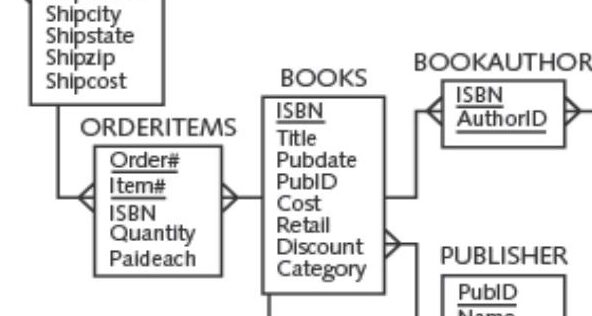
A book can have multiple authors and at the same time appear on many order items. The relationship looks like :
Orderitems -> Books <- BookauthorThis is the classic condition for a chasm trap as a standard SQL join causes a Cartesian-like row explosion. This silently multiplies your query results and produces severely inflated totals.
Example
Consider the below query displaying the number of times a book has been sold and the number of authors for the book:
SELECT
      b.title,
      SUM(oi.quantity) AS total_sold,
      count(ba.authorid) number_of_authors
FROM
            orderitems  oi
  INNER JOIN books      b  ON oi.isbn = b.isbn
  INNER JOIN bookauthor ba ON b.isbn  = ba.isbn
GROUP BY
         b.title;

TITLE                               TOTAL_SOLD    NUMBER_OF_AUTHORS
________________________________ _____________ ____________________
COOKING WITH MUSHROOMS                       8                    7
HOW TO MANAGE THE MANAGER                    1                    1
PAINLESS CHILD-REARING                      18                   15
DATABASE IMPLEMENTATION                     21                   18
BODYBUILD IN 10 MINUTES A DAY                2                    2
SHORTEST POEMS                               1                    1
E-BUSINESS THE EASY WAY                      2                    2
HOLY GRAIL OF ORACLE                         3                    1
BIG BEAR AND LITTLE DOVE                     4                    3
REVENGE OF MICKEY                            5                    4
HANDCRANKED COMPUTERS                        4                    2

11 rows selected.
If a book has 2 authors and has been ordered 3 times, this query matches every order row with every author row, multiplying the row count to 6 and double-counting the total quantity sold. In fact, the book ” PAINLESS CHILD-REARING” has only been ordered 6 times and has 3 authors but the results show a cartesian product of 3 and 6 (18) as the total sold.
See the below query showing the actual number of books sold.
SELECT
         b.title,
         SUM(oi.quantity) AS total_sold
FROM         orderitems oi
JOIN TO ONE (books b ON oi.isbn=b.isbn )
GROUP BY b.title;

TITLE                               TOTAL_SOLD
________________________________ _____________
BODYBUILD IN 10 MINUTES A DAY                1
REVENGE OF MICKEY                            5
DATABASE IMPLEMENTATION                      7
COOKING WITH MUSHROOMS                       8
HOLY GRAIL OF ORACLE                         3
HANDCRANKED COMPUTERS                        2
E-BUSINESS THE EASY WAY                      2
PAINLESS CHILD-REARING                       6
BIG BEAR AND LITTLE DOVE                     4
HOW TO MANAGE THE MANAGER                    1
SHORTEST POEMS                               1

11 rows selected.
How Join to one helps
If we apply the JOIN TO ONE clause, Oracle treats the leftmost table (Orderitems) as the authoritative Row-Widened Table (RWT) and enforces a strict many-to-one hierarchy. If you attempt to traverse downward into a one-to-many sibling path (like Bookauthor), Oracle will actively block the query or throw a runtime error rather than returning silently corrupted data.
SELECT
         b.title,
         SUM(oi.quantity) AS total_sold,
         count(ba.authorid) number_of_authors
FROM          orderitems oi
 JOIN TO ONE (books b ON oi.isbn=b.isbn , bookauthor ba ON b.isbn = ba.isbn )
GROUP BY b.title;

Error starting at line : 1 in command -
...
Error at Command Line : 7 Column : 42
Error report -
SQL Error: ORA-18640: JOIN TO ONE reached multiple rows joining to "BA", resulting in a non-unique join
Help: https://docs.oracle.com/error-help/db/ora-18640/
Solution
The solution is to make use of CTEs. Using a CTE, we can first compute the total number of books sold and then the number of authors per book and join the results of both CTEs together in order to avoid this duplication.
WITH total_books_sold as
   ( SELECT
            b.title
           ,sum(oi.quantity) total_sold
     FROM
          orderitems oi
     JOIN books b ON oi.isbn = b.isbn
     GROUP BY b.title ),
  number_of_authors_per_book as
  ( SELECT
          b.title
          ,count(ba.authorid) number_of_authors
    FROM
         bookauthor ba
    JOIN books b ON ba.isbn = b.isbn
    GROUP BY b.title )
  SELECT
         tbs.title
        ,tbs.total_sold
        ,nab.number_of_authors
  FROM
       total_books_sold tbs
JOIN number_of_authors_per_book nab ON tbs.title = nab.title ;

TITLE                               TOTAL_SOLD    NUMBER_OF_AUTHORS
________________________________ _____________ ____________________
REVENGE OF MICKEY                            5                    1
BODYBUILD IN 10 MINUTES A DAY                1                    2
HANDCRANKED COMPUTERS                        2                    2
SHORTEST POEMS                               1                    1
PAINLESS CHILD-REARING                       6                    3
COOKING WITH MUSHROOMS                       8                    1
HOLY GRAIL OF ORACLE                         3                    1
BIG BEAR AND LITTLE DOVE                     4                    1
DATABASE IMPLEMENTATION                      7                    3
HOW TO MANAGE THE MANAGER                    1                    1
E-BUSINESS THE EASY WAY                      2                    1

11 rows selected.
The results now show correctly, that the book “PAINLESS CHILD-REARING” was sold 6 times and has 3 authors. In this example, JOIN TO ONE while not being the solution to the query itself, prevented us from having multiple rows and alerted us to the chasm trap.
Main takeaways about join to one
- It helps prevent unwanted duplication of rows, chasm traps and many-to-many joins.
- There is not an absolute need to specify join conditions if foreign key constraints are defined.
- The order of the join matters, the first table is the subject of the query or the Row widened Table(RWT).
- RWT rows never multiply during joins (though rows may disappear through filters or inner joins), always maintaining a one-to-one mapping from some subset of the RWT to joined rows reached by the query.
[LEFT] OUTERis the default join type using this clause.- Explicitly specifying the Join type can be helpful for filtering out unwanted rows.
- It’s useful to explicitly define the
ONclause when multiple foreign key columns may qualify for a join or when you need a join that is not derivable from declared keys, alone.
References and Further reading
There are many other resources and blog posts to learn more about this new feature, a lot of which I consulted prior to writing this post. Here are some of them:
- Database development guide – Building Queries with Correct JOINS More Easily
- Avoid join duplicates with modern join syntax in Oracle AI Database
- Codd’s Connection Trap and Oracle’s JOIN TO ONE
- JOIN TO ONE and Constraints
Hope this is helpful.
Cheers, Harris.